Learning classifiers
|
|
|



In [1]:
import pyagrum.skbn as skbn
import pyagrum.lib.notebook as gnb
skbn is a pyAgrum’s module that allows to use bayesian networks as classifier in the scikit-learn environment. ## Initialization of parameters
First, we initialize the parameters to indicate properties we want our classifier to have.
In [2]:
BNTest = skbn.createBNClassifier(
  learningMethod="Chow-Liu",
  prior="Smoothing",
  priorWeight=0.5,
  discretizationStrategy="quantile",
  usePR=True,
  significant_digit=13,
)
Then, we train the classifier thanks to two types of objects.
Learn from csv file
In [3]:
BNTest.fitFromTabular(data="res/creditCardTest.csv", targetName="Class")
Out[3]:
BNClassifier(learningMethod='Chow-Liu', prior='Smoothing', priorWeight=0.5,
             significant_digit=13,
             type_processor=<pyagrum.lib.discreteTypeProcessor.DiscreteTypeProcessor object at 0x11580d160>,
             usePR=True)
In a Jupyter environment, please rerun this cell to show the HTML representation or trust the notebook. On GitHub, the HTML representation is unable to render, please try loading this page with nbviewer.org.
Parameters
| type_processor | <pyagrum.lib....t 0x11580d160> | |
| learningMethod | 'Chow-Liu' | |
| prior | 'Smoothing' | |
| priorWeight | 0.5 | |
| usePR | True | |
| significant_digit | 13 | |
| scoringType | 'BIC' | |
| constraints | None | |
| possibleSkeleton | None | |
| DirichletCsv | None | |
| beta | 1 |
Fitted attributes
| Name | Type | Value |
|---|---|---|
| MarkovBlanket_ | BayesNet | (pyagrum.Baye...: 9, mem: 96o} |
| bn_ | BayesNet | (pyagrum.Baye...mem: 5Ko 776o} |
| classes_ | ndarray[float64](2,) | [0.,1.] |
| feature_names_in_ | ndarray[object](30,) | ['Time','V1','V2',...,'V27','V28','Amount'] |
| fromModel_ | bool | False |
| label_ | str | '1.0' |
| learner_ | BNLearner | (pyagrum.BNLe... : 0.500000 |
| n_features_in_ | int | 30 |
| targetType_ | Float64DType | dtype('float64') |
| target_ | str | 'Class' |
| threshold_ | float64 | 0.121 |
| variableNameIndexDictionary_ | dict | {'Amount': 29, 'Time': 0, 'V1': 1, 'V10': 10, ...} |
In [4]:
for i in BNTest.bn_.nodes():
  print(BNTest.bn_.variable(i))
Class:Labelized({0.0|1.0})
Time:Discretized(<(0;1578[,[1578;3733[,[3733;6982[,[6982;11033[,[11033;170348)>)
V1:Discretized(<(-30.55238004;-1.332949264[,[-1.332949264;-0.654664391[,[-0.654664391;0.30537512[,[0.30537512;1.183457866[,[1.183457866;2.132386021)>)
V2:Discretized(<(-25.64052693;-0.362407881[,[-0.362407881;0.104021894[,[0.104021894;0.582468095[,[0.582468095;1.126264537[,[1.126264537;22.05772899)>)
V3:Discretized(<(-31.10368482;0.107723002[,[0.107723002;0.675277319[,[0.675277319;1.145250512[,[1.145250512;1.731063013[,[1.731063013;4.101716178)>)
V4:Discretized(<(-4.657545034;-0.8356831[,[-0.8356831;0.033423475[,[0.033423475;0.648385592[,[0.648385592;1.445625927[,[1.445625927;12.11467184)>)
V5:Discretized(<(-22.10553152;-0.8136663[,[-0.8136663;-0.355922897[,[-0.355922897;0.03294682[,[0.03294682;0.534604692[,[0.534604692;11.97426887)>)
V6:Discretized(<(-7.574798166;-0.789777644[,[-0.789777644;-0.370597233[,[-0.370597233;0.035355351[,[0.035355351;0.711815449[,[0.711815449;10.03392286)>)
V7:Discretized(<(-43.55724157;-0.691953395[,[-0.691953395;-0.264737855[,[-0.264737855;0.111993062[,[0.111993062;0.576160082[,[0.576160082;12.21924885)>)
V8:Discretized(<(-41.04426092;-0.248777743[,[-0.248777743;-0.061897336[,[-0.061897336;0.101158949[,[0.101158949;0.417327159[,[0.417327159;20.00720837)>)
V9:Discretized(<(-13.43406632;-0.258885741[,[-0.258885741;0.43278337[,[0.43278337;1.003150701[,[1.003150701;1.606746899[,[1.606746899;10.39288882)>)
V10:Discretized(<(-24.58826244;-0.887241636[,[-0.887241636;-0.486914228[,[-0.486914228;-0.174270174[,[-0.174270174;0.281998033[,[0.281998033;12.25994935)>)
V11:Discretized(<(-2.595325047;-0.216850152[,[-0.216850152;0.467606404[,[0.467606404;1.069280983[,[1.069280983;1.894362474[,[1.894362474;12.01891318)>)
V12:Discretized(<(-18.68371463;-2.603364421[,[-2.603364421;-1.98917204[,[-1.98917204;-1.010277351[,[-1.010277351;0.297745303[,[0.297745303;3.774837253)>)
V13:Discretized(<(-3.389510119;-0.277525814[,[-0.277525814;0.487335344[,[0.487335344;1.191999923[,[1.191999923;1.871678101[,[1.871678101;4.465413177)>)
V14:Discretized(<(-19.21432549;-0.198436291[,[-0.198436291;0.394380416[,[0.394380416;1.129212699[,[1.129212699;1.560400117[,[1.560400117;5.7487338)>)
V15:Discretized(<(-4.498944677;-0.89821835[,[-0.89821835;-0.252119146[,[-0.252119146;0.228108992[,[0.228108992;0.673845558[,[0.673845558;2.533660621)>)
V16:Discretized(<(-14.12985452;-0.73752994[,[-0.73752994;-0.191439365[,[-0.191439365;0.226074322[,[0.226074322;0.649708023[,[0.649708023;3.930881236)>)
V17:Discretized(<(-25.16279937;-0.373269972[,[-0.373269972;0.063135741[,[0.063135741;0.445363418[,[0.445363418;0.906547825[,[0.906547825;7.893392532)>)
V18:Discretized(<(-9.498745921;-0.642528115[,[-0.642528115;-0.1793428[,[-0.1793428;0.166270273[,[0.166270273;0.556347095[,[0.556347095;4.115559919)>)
V19:Discretized(<(-4.932733055;-0.673232673[,[-0.673232673;-0.228782999[,[-0.228782999;0.150300643[,[0.150300643;0.636971987[,[0.636971987;5.22834179)>)
V20:Discretized(<(-13.27603434;-0.183661648[,[-0.183661648;-0.067770251[,[-0.067770251;0.044433337[,[0.044433337;0.232763125[,[0.232763125;11.05900429)>)
V21:Discretized(<(-22.79760391;-0.298193493[,[-0.298193493;-0.179496901[,[-0.179496901;-0.054862175[,[-0.054862175;0.105119219[,[0.105119219;27.20283916)>)
V22:Discretized(<(-8.887017141;-0.649013527[,[-0.649013527;-0.291807777[,[-0.291807777;0.009627985[,[0.009627985;0.351257859[,[0.351257859;8.361985192)>)
V23:Discretized(<(-19.25432762;-0.215264519[,[-0.215264519;-0.092460674[,[-0.092460674;-1.53e-05[,[-1.53e-05;0.122578904[,[0.122578904;13.87622086)>)
V24:Discretized(<(-2.51237651;-0.441546648[,[-0.441546648;-0.013724876[,[-0.013724876;0.248363887[,[0.248363887;0.468668566[,[0.468668566;3.200201195)>)
V25:Discretized(<(-4.781605522;-0.238381673[,[-0.238381673;0.02446896[,[0.02446896;0.212093775[,[0.212093775;0.411607181[,[0.411607181;5.525092704)>)
V26:Discretized(<(-1.338556498;-0.390763459[,[-0.390763459;-0.124995177[,[-0.124995177;0.128836809[,[0.128836809;0.664810252[,[0.664810252;3.517345612)>)
V27:Discretized(<(-7.976099818;-0.097082439[,[-0.097082439;-0.025569225[,[-0.025569225;0.034724233[,[0.034724233;0.216123366[,[0.216123366;4.173387153)>)
V28:Discretized(<(-3.054084903;-0.043029565[,[-0.043029565;0.006334972[,[0.006334972;0.029936485[,[0.029936485;0.111331248[,[0.111331248;4.860769069)>)
Amount:Discretized(<(0;2.78[,[2.78;11.66[,[11.66;25.52[,[25.52;73.5[,[73.5;4002.88)>)
In [5]:
gnb.sideBySide(BNTest.bn_, gnb.getInference(BNTest.bn_, size="15!"))
In [6]:
gnb.showBN(BNTest.MarkovBlanket_)
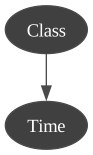
Learn from array-likes
We use a method to transform the csv file in two array-likes in order to train from the same database.
In [7]:
# we use now another method to learn the BN (MIIC)
BNTest = skbn.createBNClassifier(
  learningMethod="MIIC",
  prior="Smoothing",
  priorWeight=0.5,
  discretizationStrategy="quantile",
  usePR=True,
  significant_digit=13,
)

xTrain, yTrain = BNTest.XYfromCSV(filename="res/creditCardTest.csv", target="Class")
In [8]:
BNTest.fit(xTrain, yTrain)
Out[8]:
BNClassifier(prior='Smoothing', priorWeight=0.5, significant_digit=13,
             type_processor=<pyagrum.lib.discreteTypeProcessor.DiscreteTypeProcessor object at 0x1162688a0>,
             usePR=True)
In a Jupyter environment, please rerun this cell to show the HTML representation or trust the notebook. On GitHub, the HTML representation is unable to render, please try loading this page with nbviewer.org.
Parameters
| type_processor | <pyagrum.lib....t 0x1162688a0> | |
| prior | 'Smoothing' | |
| priorWeight | 0.5 | |
| usePR | True | |
| significant_digit | 13 | |
| learningMethod | 'MIIC' | |
| scoringType | 'BIC' | |
| constraints | None | |
| possibleSkeleton | None | |
| DirichletCsv | None | |
| beta | 1 |
Fitted attributes
| Name | Type | Value |
|---|---|---|
| MarkovBlanket_ | BayesNet | (pyagrum.Baye...m: 293Ko 288o} |
| bn_ | BayesNet | (pyagrum.Baye...Mo 117Ko 968o} |
| classes_ | ndarray[float64](2,) | [0.,1.] |
| feature_names_in_ | ndarray[object](30,) | ['Time','V1','V2',...,'V27','V28','Amount'] |
| fromModel_ | bool | False |
| label_ | str | '1.0' |
| learner_ | BNLearner | (pyagrum.BNLe... : 0.500000 |
| n_features_in_ | int | 30 |
| targetType_ | Float64DType | dtype('float64') |
| target_ | str | 'Class' |
| threshold_ | float64 | 0.5612 |
| variableNameIndexDictionary_ | dict | {'Amount': 29, 'Time': 0, 'V1': 1, 'V10': 10, ...} |
In [9]:
gnb.showBN(BNTest.bn_)
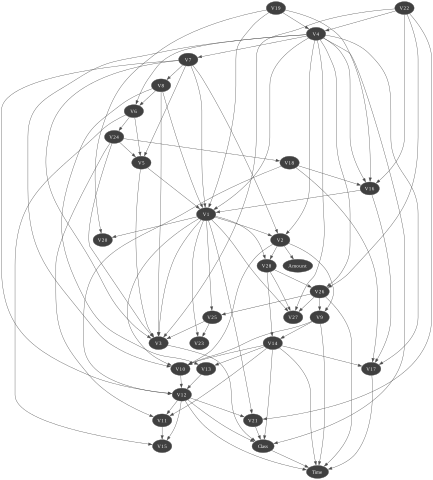
In [10]:
gnb.showBN(BNTest.MarkovBlanket_)
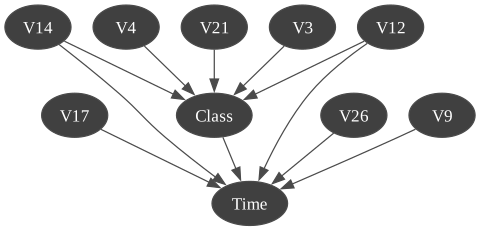
Create a classifier from a Bayesian network
If we already have a Bayesian network with learned parameters, we can create a classifier that uses it. In this case we do not have to train the classifier on data since it the Bayesian network is already trained.
In [11]:
ClassfromBN = skbn.createBNClassifier(significant_digit=7)
In [12]:
ClassfromBN.fromTrainedModel(
  bn=BNTest.bn_,
  targetAttribute="Class",
  targetModality="1.0",
  threshold=BNTest.threshold_,
  variableList=xTrain.columns.tolist(),
)
In [13]:
gnb.showBN(ClassfromBN.bn_)
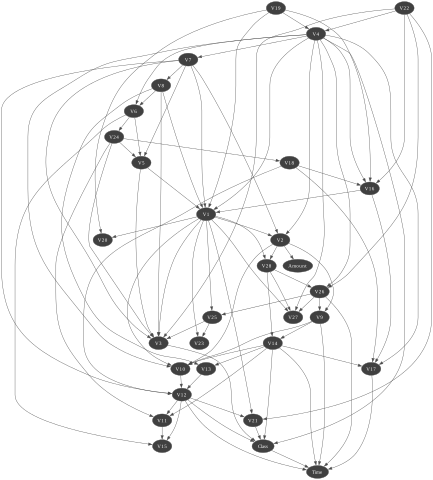
In [14]:
gnb.showBN(ClassfromBN.MarkovBlanket_)
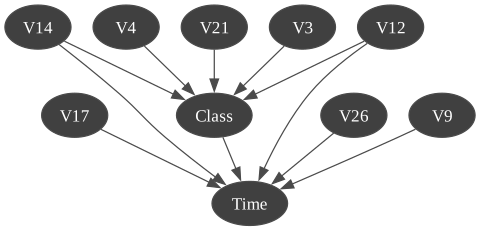
Then, we work with functions from scikit-learn like score. We can also call it with a csv file or two array-likes.
In [15]:
xTest, yTest = ClassfromBN.XYfromCSV(filename="res/creditCardTest.csv", target="Class")
Prediction for classifier
Prediction with csv file
In [16]:
scoreCSV1 = BNTest.score("res/creditCardTest.csv", y=yTest)
print("{0:.2f}% good predictions".format(100 * scoreCSV1))
99.77% good predictions
In [17]:
scoreCSV2 = ClassfromBN.score("res/creditCardTest.csv", y=yTest)
print("{0:.2f}% good predictions".format(100 * scoreCSV2))
99.77% good predictions
Prediction with array-like
In [18]:
scoreAR1 = BNTest.score(xTest, yTest)
print("{0:.2f}% good predictions".format(100 * scoreAR1))
99.77% good predictions
In [19]:
scoreAR2 = ClassfromBN.score(xTest, yTest)
print("{0:.2f}% good predictions".format(100 * scoreAR2))
99.77% good predictions
ROC and Precision-Recall curves with all methods
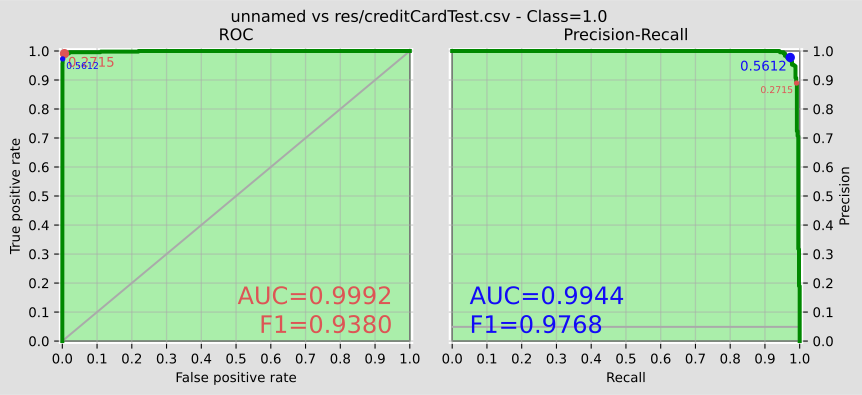
In addition (and of course), we can work with functions from pyagrum (from pyagrum.lib.bn2roc).
In [20]:
BNTest.showROC_PR("res/creditCardTest.csv")
In [ ]: